When your Claude Code limit runs out by midweek, the first instinct is to trim prompts. But the prompt is a small part of the bill. Limits are eaten by redos, when the agent misread the task and did it twice. They're eaten by a session that took on three more things “while it was at it”, by a top model fixing a typo, and by five agents where two would do. Treeyard plugs these leaks with the way the work is set up, not with willpower.
#Where the limit actually goes
We covered a short session start separately: a session opened from a node starts at about 3 thousand tokens instead of 65 thousand for the whole plan. But most tokens go into the work itself. Here's where they leak:
Where it leaks
- The agent misread the task, so it starts over
- One session for three tasks
- A top model fixing a typo
- “Check that everything works” — another agent turn
- Five agents hit the window mid‑task
How Treeyard plugs it
- Every node has a “done when”, and the session starts with a plan
- A node is one session; a new idea is a new node
- Model and effort are picked for every launch
- The node's check is a command, no agent involved
- A queue with a cap that pauses when the window is full
#A redo is the most expensive line on the bill
The agent takes a vague task, does its own thing, you explain, it redoes it. Every attempt pays for the whole context again. In Treeyard every node has a “done when”: one sentence you can see or run. Can't write it? The node menu has “Write a "done when"” and “Break into steps”: jobs for an agent without a session, read‑only and offline.
Then there's the “plan” start. Claude Code opens in its plan mode and edits nothing until you agree. Fixing a five‑line plan is cheaper than rolling back code.
#Short sessions cost less than long ones
Every new turn carries the whole conversation. A session that spends three hours finishing “just one more” neighbouring thing pays for its entire history at every step. Treeyard's rule: a node is one session or one PR. More than about ten items inside, or “just a bit more” after it's closed, means the node needs splitting.
A new thought in the middle of the work becomes a node with the “idea” status, and the session goes back to its own node:
treeyard add "Coffee quiz: find your roast" --parent <id> --status ideaThe next session starts with a clean slate, but not from scratch: it gets the node's journal by itself.
#Model and effort to fit the task
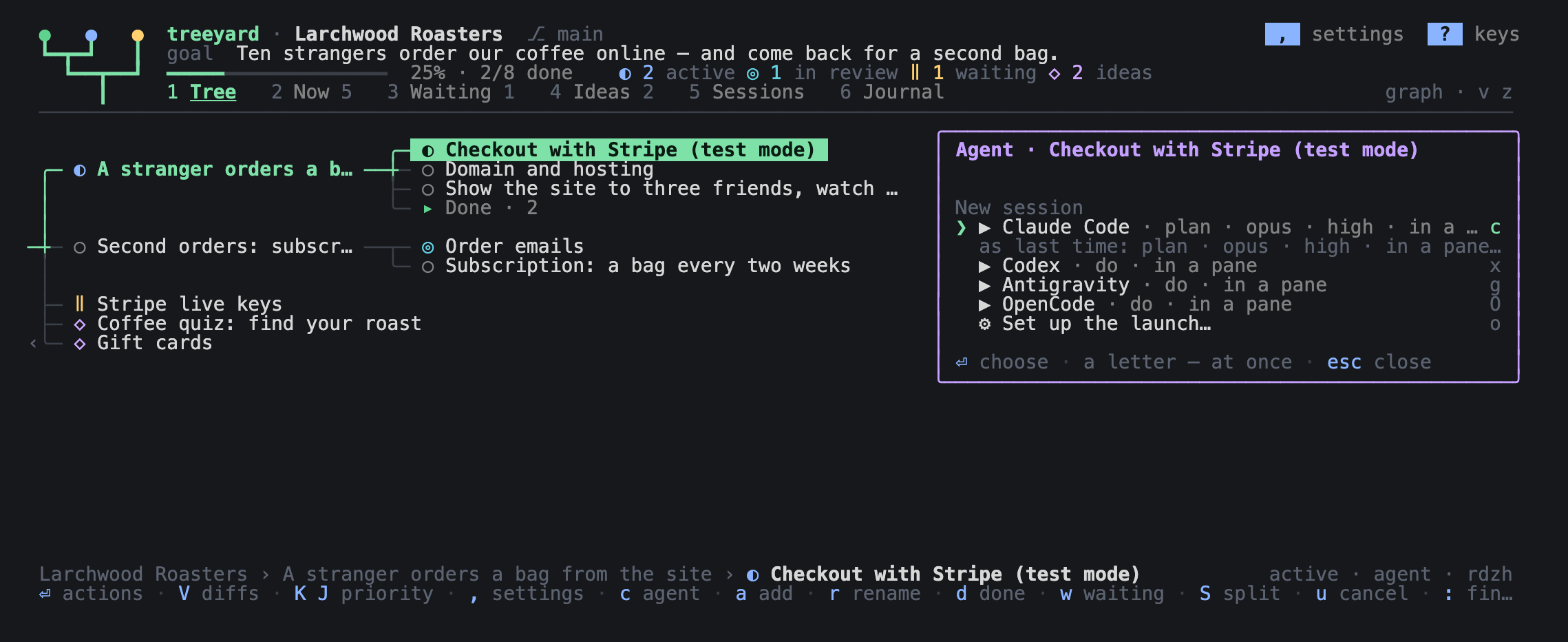
A top model on high effort burns through the limit faster, and there's no point spending it on small stuff. In Treeyard the model and effort are picked for every launch: the agent menu shows each CLI's start, model and effort, and each CLI's last launch is remembered separately. Planning a tricky node goes to the top model; renaming a button goes to a smaller one or to low effort. treeyard models lists the models and effort levels, and the project defaults are model and effort.
#Check with a command, not an agent turn
“Check that everything works” is one more agent turn, and what you get back is its word. A node has a “check” field: the command that proves the result — tests, curl, a script. The t key runs it without an agent, so it costs nothing from your limit. When the agent finishes, it also shows the command and its output instead of writing “done”.
#How many agents at once
Parallel agents share one subscription window. Five at once drain it faster, and a session that hits the limit stops mid‑task — until the window resets, you're left holding unfinished work.
treeyard queue <id> --parallel 2 runs a branch's nodes in order, no more than two at a time. Before each launch the queue looks at the subscription window, using what the CLI saved itself, without a request to the model. If the window is 90% full (--limit), new sessions wait for the reset.
#Try it on your project
Install
npm install -g @antondanv/treeyard. You need Node.js 22 or newer and Claude Code, Codex, Antigravity or OpenCode.
Plant a tree
Run treeyard in the project folder. The wizard offers to plant it with an agent, which reads the code, docs and commit history itself, or from a template.
Open a session from a node
c on a node. The agent gets the node, its criterion and its journal, not the whole plan.
treeyard models                                # models and effort levels per CLI
treeyard add "…" --parent <id> --status idea   # the idea goes to the tree, not this session
treeyard queue <id> --pane --parallel 2        # a branch in order, two sessions at a time
Questions
When don't I need Treeyard?
claude or codex is simpler there: the tree would take longer than the task. The same goes for a one‑evening prototype.